Version 1.0.1 · Free and open source

Compare With Branch for VS Code, IntelliJ-style.

Pick a branch, tag or commit. Chevron lists every file you’ve changed since you diverged, opens each in VS Code’s own diff editor, and puts ← Take from main on every changed block, so you can pull back just that hunk.

Quick Open: ext install MJEvansDev.chevron
  • No account
  • No telemetry
  • No AI, no Pro tier
  • MIT licensed
Silent demo: choosing main in Chevron, opening src/pricing.ts, clicking “← Take from main” on a changed block, undoing it, then jumping between changes with Alt+F7.

Why Chevron

The flow you miss from JetBrains, and nothing else.

If you’ve come from IntelliJ, WebStorm, PyCharm or Rider, you know it: Git → Compare with Branch, a list of changed files, a side-by-side diff, and a chevron to take a block back. VS Code has most of the pieces but not that flow. Chevron is that flow.

  • Merge-base diffs

    You see only what changed on your side since you diverged, not everything that has landed on theirs since.

  • Take hunks across

    Every changed block gets a labelled action that pulls the branch’s version back. One undo step, and it never saves for you.

  • Native and small

    VS Code’s own diff editor, tree view and themes. No custom renderer, no sign-in, no background network calls.

Features

Everything you need to review a branch.

← Take from branch

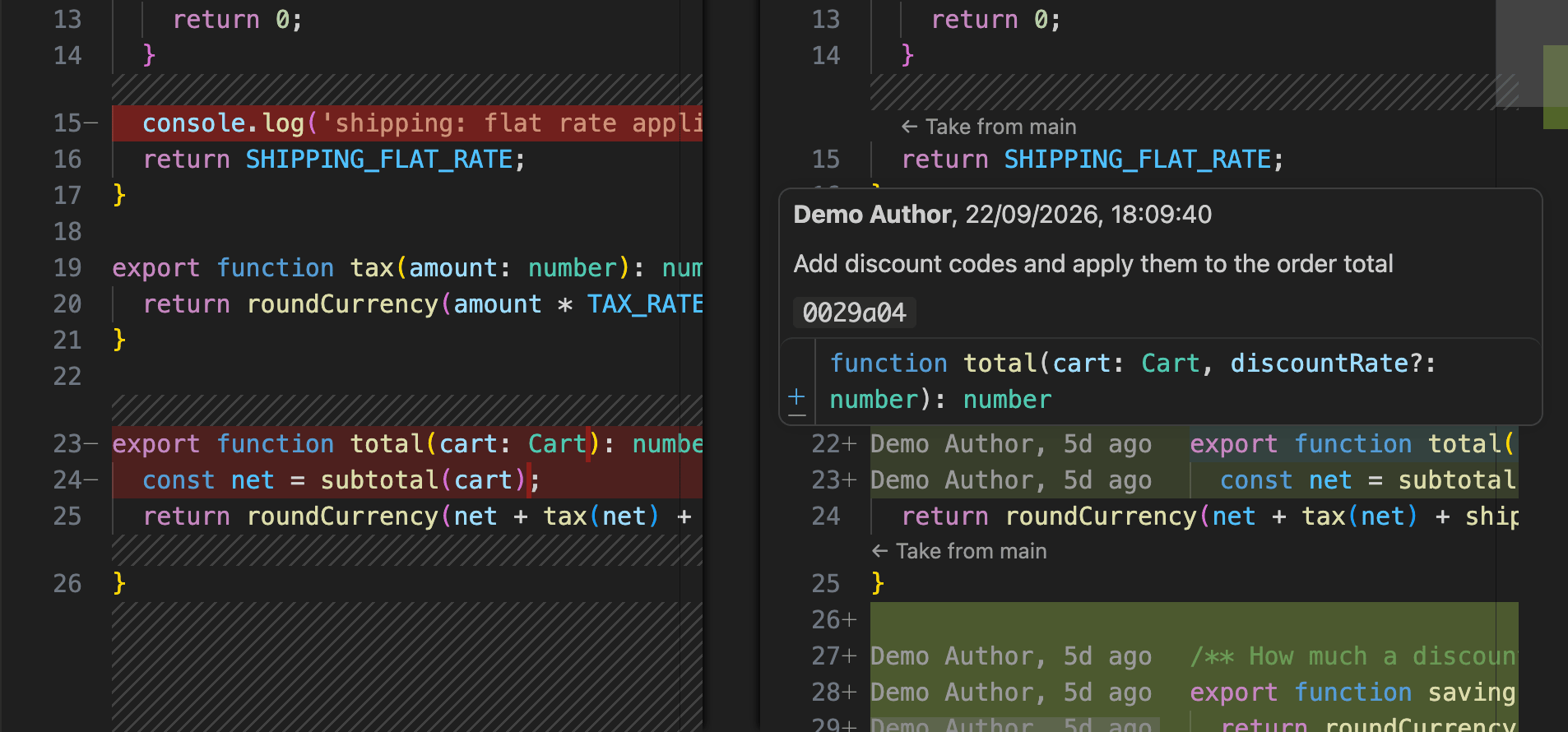
In a Chevron diff, each changed block in your working file gets a ← Take from <branch> action. Click it and the block is replaced with the branch’s version: additions removed, deletions restored, modifications reverted.

It’s a single edit, so one Ctrl/⌘ Z undoes it. If the file changed underneath it, Chevron refuses to apply rather than guessing.
Clicking “← Take from main” above the total function replaces the block with main’s version; Command Z brings it back.

Changed files at a glance

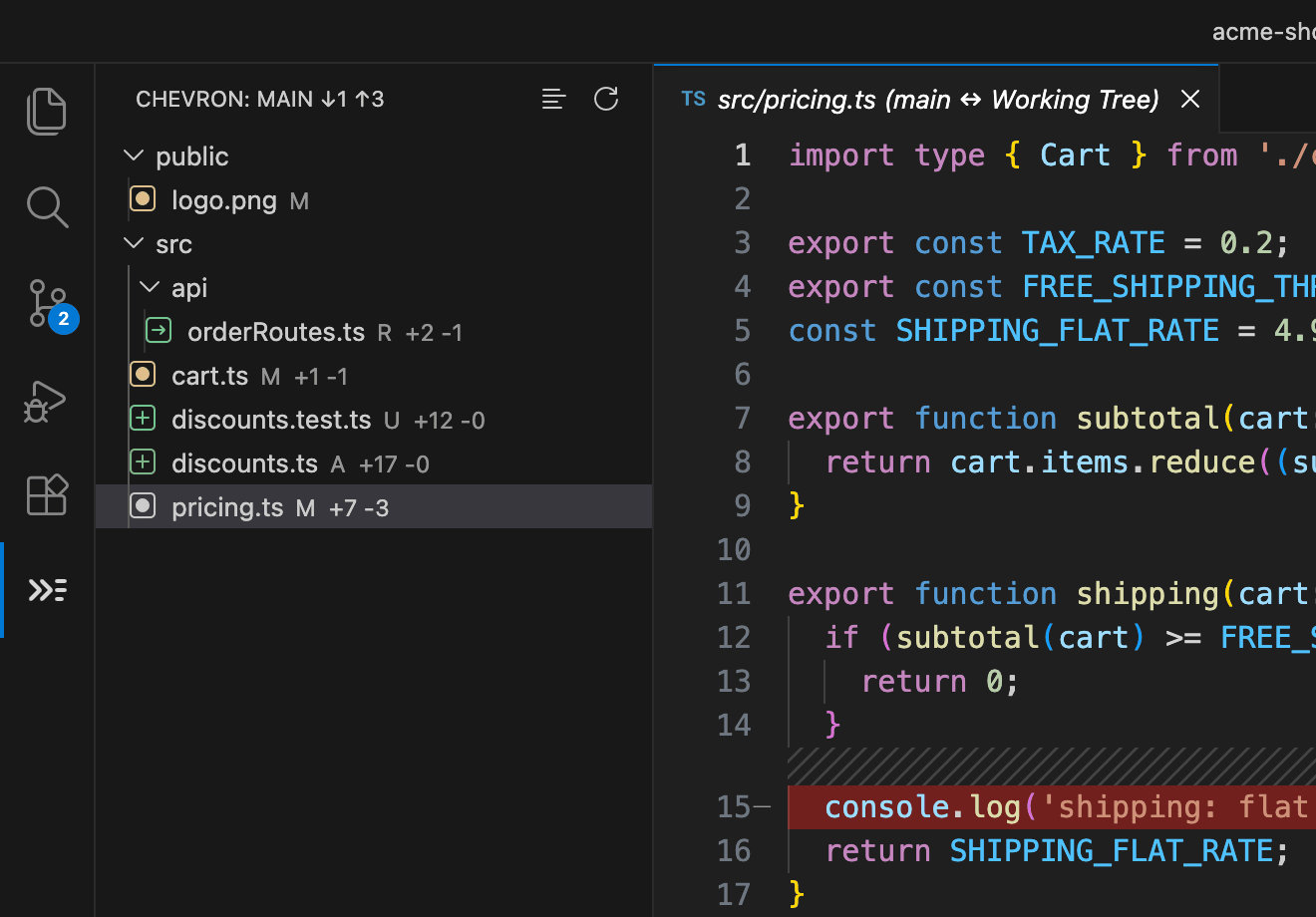
The Chevron view lists every changed file, coloured like Source Control (added, modified, deleted, renamed, untracked), each with its +added −deleted line counts.

The header shows how far you’ve diverged, like main ↓3 ↑5, and refreshes itself after a save, commit, checkout or pull.

The Chevron view headed “main ↓1 ↑3”, listing renamed, modified, added and untracked files with line counts, beside a diff.

Compare with any branch, tag or commit

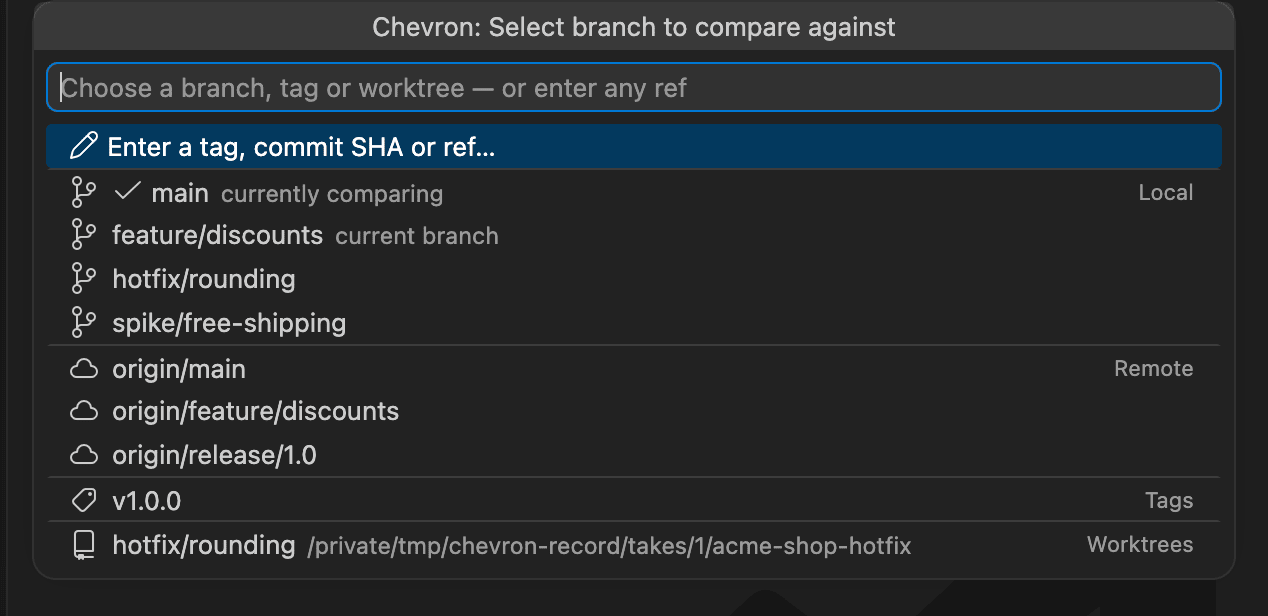
The picker groups local branches, remote branches, tags and other worktrees, and it’s searchable. Or paste anything git rev-parse understands.

Choose another worktree and Chevron compares live against its files on disk, uncommitted edits included.

The branch picker, grouped into Local, Remote, Tags and Worktrees, with main marked as currently comparing.

Walk every change, across files

Alt F7 and Shift Alt F7 jump hunk by hunk, and roll over into the next changed file when you reach the end of one. It’s IntelliJ’s F7, across the whole comparison.

Alt+F7 moving from a change in cart.ts to discounts.test.ts, discounts.ts, then two changes in pricing.ts.

Blame, where it helps

Hover any line on either side of a diff for its author, date, commit summary and hash. Toggle compact author, 3d ago labels beside the lines you changed.

Blame labels beside changed lines, and a hover showing the author, date, commit summary and hash.
  • Multi-root workspaces

    Each repository keeps its own comparison. The view follows the file you’re editing.

  • Tree or list

    Nested folders, or a flat list with each file’s folder beside it. Toggle it from the view’s title bar.

  • Sensible defaults

    Picks origin/HEAD, main or master automatically, or whatever you configure per folder.

How it compares

One job, done properly.

If you want AI agents, a Kanban board and a full git client, GitLens is excellent. Chevron does one thing.

Chevron compared with GitLens and typical branch-diff extensions
Capability Chevron GitLens Typical branch-diff extensions
Changed-files tree against any branch, tag or SHA YesYes, inside a larger UIYes
Merge-base (“three-dot”) diffing YesYesSome
← Take from <branch> on every hunk, stale-checked, one undo step YesNoNo
Jump to the next change across files YesNoNo
Compare against another worktree, live YesNoNo
Account, Pro tier or telemetryNoneAccount for some featuresVaries

VS Code’s diff editor has its own small “Revert Block” arrow in the gutter, and it works in Chevron’s diffs too. Chevron adds a labelled action that names the branch it takes from, a keyboard route, and a check that refuses to apply to a file that changed underneath it.

Get started

Up and running in a minute.

  1. Install Chevron from the Visual Studio Marketplace, or from Open VSX in Cursor, VSCodium or Windsurf.
  2. Open a git repository and click the Chevron icon in the Activity Bar. It picks your main branch automatically.
  3. Click a changed file to open its diff. Use ← Take from main on any block, or Alt F7 to walk every change.

Default shortcuts

Diff current file against branch
Ctrl/⌘ K then Shift D
Take change under cursor
Ctrl/⌘ K then Shift T
Next change
Alt F7
Previous change
Shift Alt F7
Toggle blame annotations
Ctrl/⌘ K then Shift B
Select branch to compare
Command Palette

Privacy

Collects nothing. Sends nothing.

Chevron has no telemetry and makes no network requests. It runs your local git and nothing else, and its source is on GitHub under the MIT licence. This website sets no cookies and uses no analytics.

Bring Compare With Branch to VS Code.

Requires VS Code 1.90 or later and git on your PATH. Works on Windows, macOS and Linux.